
3CX Communications System: Remote Office Access
Overview
The 3CX Communications System is a mobile application designed to extend office communication capabilities to remote users. Developed by 3CX, the app enables employees to access their office extension directly from an iPhone, maintaining seamless connectivity regardless of physical location. This tool is particularly useful for businesses aiming to support remote work, allowing team members to stay in sync with colleagues and clients while on the move.
By linking the mobile app to a 3CX system—either self-hosted or cloud-based—users can make and receive calls, access voicemail, and manage contacts using their office phone number. The app is not a standalone communication platform but functions as an extension of an existing 3CX infrastructure, requiring integration with 3CX V18 or later. This dependency ensures consistency with corporate communication policies and security standards.
Real-world use cases include field service technicians, remote sales teams, and distributed workforces needing reliable access to office lines. The app simplifies remote work by eliminating the need for separate mobile numbers or third-party calling tools. Instead, users retain their office identity while working outside the office, enhancing professionalism and operational continuity.
Key Features & Capabilities
- Office Extension Access: Users can access their office phone number and extension directly from the iPhone, enabling seamless call handling as if they were in the office.
- QR Code Pairing: The app uses a simple QR code scan from the web client to establish a secure connection with the 3CX system, streamlining setup and reducing configuration errors.
- Cloud and On-Premise Compatibility: Supports integration with both hosted 3CX cloud services and self-hosted installations, offering flexibility for businesses with varying IT infrastructures.
- Unified Communication: Enables access to voicemail, contact lists, and call history, ensuring consistent communication across devices.
- Remote Work Enablement: Designed to support distributed teams by maintaining office communication continuity during remote or hybrid work scenarios.
For example, a sales representative can receive a client call on their office number while visiting a customer site, ensuring brand consistency. Similarly, a manager can check voicemails or transfer calls from their mobile device, maintaining operational efficiency. These features are especially valuable for organizations already invested in the 3CX ecosystem, as they enhance mobility without requiring additional tools or training.
User Interface, Workflow & Performance
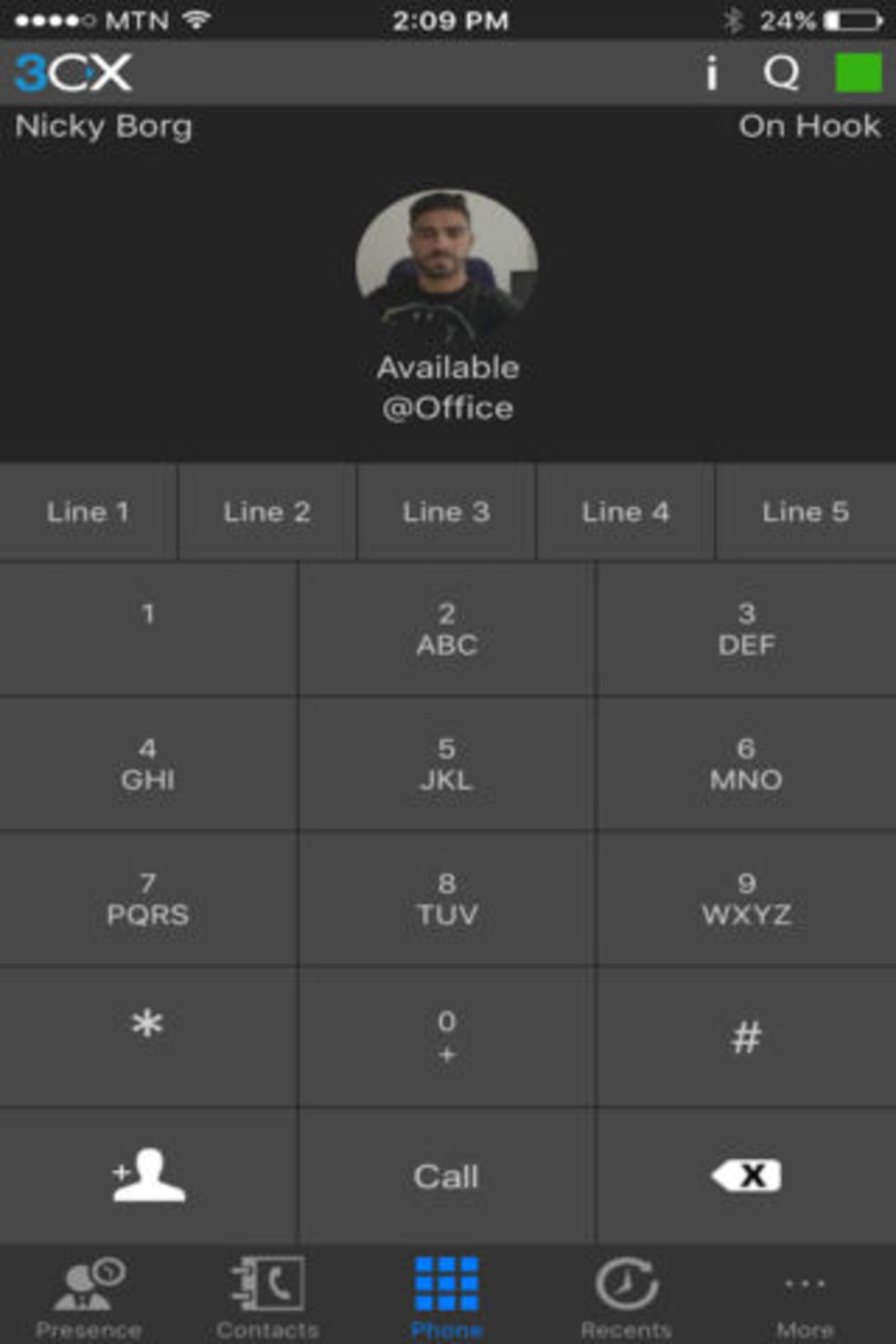
The user interface of the 3CX Communications System is designed for simplicity and efficiency, prioritizing core telephony functions. The main screen displays a clean layout with a dial pad, recent calls, and contact access, minimizing clutter and enabling quick actions. Navigation is intuitive, relying on standard iOS gestures and a bottom tab bar for switching between key sections.
Workflow begins with scanning a QR code from the 3CX web client, which automatically configures the app and establishes a secure connection. Once paired, users can initiate calls, access voicemail, and manage contacts with minimal steps. The app maintains a consistent experience across sessions, reducing cognitive load and supporting rapid adoption.
Performance observations are based on general software behavior patterns. The developer did not specify resource usage details. Stability is expected to align with standard iOS app standards, particularly when connected to a reliable 3CX infrastructure. No reported issues with crashes or freezes were mentioned in the provided information.
Compatibility & System Requirements
The 3CX Communications System is available exclusively for iPhone devices. It requires 3CX V18 or later to function, confirming compatibility with the specified version. The installation size is 52.3 MB, which is within typical ranges for mobile communication apps.
Exact system requirements were not listed. The developer did not provide additional system requirements. Platform compatibility information is limited to iPhone, with no mention of iPad or other iOS devices. Users should ensure their iPhone model supports the latest iOS version required by the app, though specific details were not included.
Pros and Cons
Pros
- Seamless integration with existing 3CX systems (cloud or on-premise)
- Simple setup via QR code pairing
- Retains office phone identity while working remotely
- Free to download and use
- Optimized for iPhone with intuitive interface
Cons
- Not a standalone app; requires 3CX V18 or later
- Available only for iPhone, no support for other platforms
- Compatibility limited to specific 3CX versions
- No information on background operation or battery usage
- Requires an active 3CX infrastructure to function
FAQ Section
Is the 3CX Communications System compatible with all iPhone models?
The app is designed for iPhone, but specific device compatibility details were not provided. Users should ensure their device supports the required iOS version, though exact requirements are not specified.
Can I use this app without a 3CX account?
No. The app is not a standalone communication tool and requires integration with a 3CX system running version 18 or later.
Is the app secure?
Security is maintained through the 3CX infrastructure and the QR code pairing process. The developer did not provide additional details on encryption or data handling.
Does the app require an internet connection?
Yes. The app relies on a stable internet connection to maintain communication with the 3CX system, whether hosted on-premise or in the cloud.
Can I use the app offline?
Offline functionality is not supported. The app requires an active connection to the 3CX system to perform calls, access voicemail, or retrieve contacts.
Final Thoughts & CTA
The 3CX Communications System delivers a focused, reliable solution for businesses already using 3CX V18 or later. By extending office phone capabilities to iPhone users, it enhances remote work flexibility without compromising communication standards. While limited to iOS and dependent on an existing 3CX setup, its simplicity, free access, and seamless integration make it a valuable asset for mobile professionals.
For organizations invested in the 3CX ecosystem, this app removes barriers to remote productivity. It ensures team members remain reachable under their office identity, promoting consistency and trust. Despite its platform-specific nature, the app excels in its intended use case.
Download 3CX Communications System now